HLS vs DASH: choosing the right streaming protocol for your platform

You’ve built amazing content. Your video streaming platform is ready to launch. But there’s one critical decision that will determine whether your viewers in Tokyo can watch as smoothly as those in Toronto, whether iPhone users see the same video quality as Android fans, and whether your platform scales to millions without breaking: choosing your streaming protocol.
Unfortunately, not all video streaming protocols reach all audiences equally. Pick the wrong one, and you’ll either lock out significant portions of your potential viewers or face unnecessary technical complexity that slows your time-to-market.
The two dominant players are HLS (HTTP Live Streaming) and DASH (Dynamic Adaptive Streaming over HTTP). Both deliver high-quality video streaming that adjusts to network conditions. Both power the world’s biggest streaming services. Yet they solve the streaming video challenge in fundamentally different ways, each with distinct advantages depending on your audience and technical requirements.
This guide cuts through the technical jargon to help you understand what HLS and DASH actually do, how they differ in practice, and most importantly, how to choose the right protocol.
What are streaming protocols?
Streaming protocols are standardised sets of rules that govern how video content travels from your streaming servers to viewers’ devices over the internet. They’re the invisible infrastructure that makes video streaming work smoothly across millions of devices simultaneously.
How do streaming protocols work?
Here’s what happens when someone presses play on your streaming platform: the streaming protocol splits your video into small video segments—typically just a few seconds each. These segments travel across the internet to the viewer’s device, where they’re reassembled and played back in the correct order.
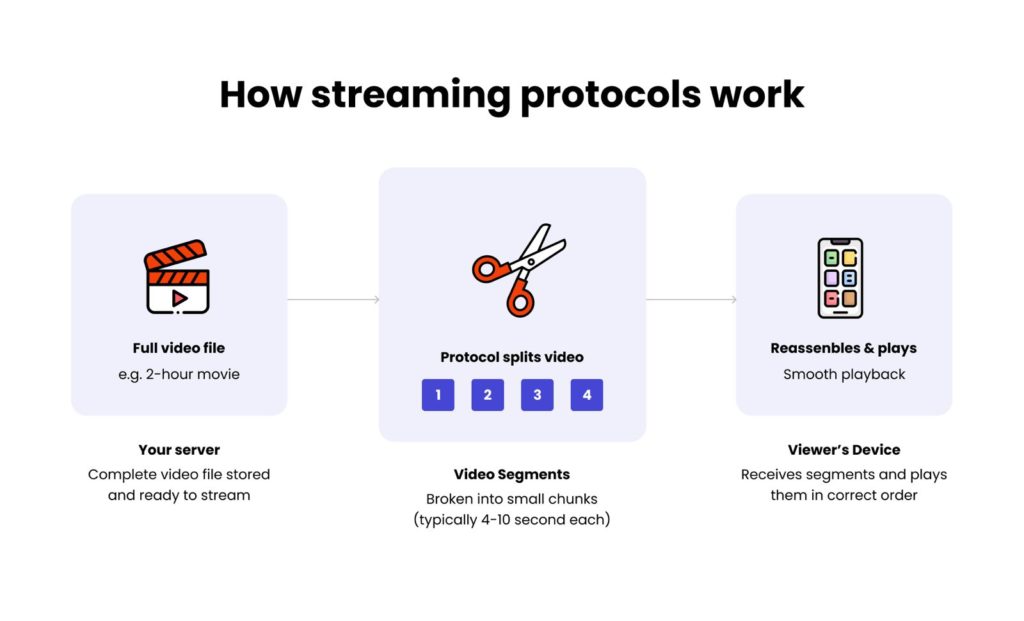
This chunking approach solves a fundamental problem: instead of downloading an entire two-hour film before watching, viewers can start watching within seconds while the rest of the content loads in the background.
Streaming protocols vs codecs: what’s the difference?
People often confuse streaming protocols with video codecs, but they do completely different jobs.
Video codecs (such as H.264 or H.265) compress your video files to reduce their size. Think of a codec as a compression tool—it takes a massive raw video file and shrinks it down so it doesn’t consume huge amounts of bandwidth.
Streaming protocols (such as HLS or DASH) handle delivery. They take that compressed video, break it into chunks, and manage how those chunks travel across the internet to reach viewers.
Here’s a simple analogy: if you’re sending a package internationally, the codec is how you pack the box to make it lighter and smaller. The protocol is the shipping service that actually delivers it—deciding the route, handling customs, and ensuring it arrives intact.
Both are essential for video streaming, but this guide focuses on video streaming protocols—the delivery mechanism that determines which devices can watch your content and how smoothly it plays.
What is adaptive bitrate streaming?
Now you understand the basics, but there’s one more crucial piece: what happens when viewers have different internet speeds, or when their internet connection changes mid-stream?
That’s where ABR comes in.
Adaptive bitrate streaming (ABR) is the technology that makes video streaming actually work in the real world. It automatically adjusts video quality in real time based on each viewer’s internet connection.
Without ABR, you’d be stuck with an impossible choice: deliver high-quality video that buffers constantly for slower connections, or deliver low-quality video that works everywhere but looks rubbish even when viewers have bandwidth to spare.
Adaptive bitrate streaming solves both problems simultaneously by creating multiple versions of your video—maybe 1080p, 720p, 480p, and 360p. Each version gets split into small video segments (typically 2-10 seconds each).
When someone presses play, their device starts conservatively with a quality level it knows will work. After each segment, it checks: “Did that download smoothly? Can I go higher?” If yes, it requests better quality for the next segment. If the connection struggles, it drops down to prevent buffering.
This is why you sometimes notice streaming content looking slightly softer for a moment when your Wi-Fi hiccups, then sharpening back up when the connection recovers. That’s ABR preventing the spinning buffer wheel.
Both HLS and DASH support adaptive bitrate streaming—but they take different approaches. Let’s see what that means for your streaming platform.
What is HLS (HTTP Live Streaming)?
HTTP Live Streaming (HLS) is the most widely used streaming protocol today. Originally developed by Apple in 2009, HLS has become the default choice because it plays on nearly every device your viewers own.
HLS divides content into short chunks (typically 6-10 seconds each) and delivers them over standard HTTP connections—the same technology websites use. This means you don’t need expensive specialised infrastructure. Standard web servers and content delivery networks handle everything.
The protocol uses a text-based playlist file (.m3u8) that lists available segments and quality options. As network conditions change, the viewer’s device automatically switches between them—that’s the adaptive bitrate streaming we discussed earlier.
HLS works with H.264 and H.265 codecs—formats that virtually all devices understand. The main trade-off is latency: standard HLS introduces 6-30 seconds of delay, prioritising reliability over speed. For real-time applications like live sports betting, Apple introduced Low-Latency HLS (LL-HLS), reducing delays to around 2 seconds.
HLS – pros and cons
Pros:
- Universal reach: Plays natively on iOS through Safari and AVPlayer, on Android via ExoPlayer, and in all major browsers using JavaScript libraries like HLS.js. Smart TVs, gaming consoles, and streaming devices support it universally
- Infrastructure simplicity: Standard CDN services work perfectly—no proprietary streaming servers needed
- Network resilience: Adjusts smoothly when connections degrade, keeping playback running rather than stopping
- Security options: Built-in encryption protects content from unauthorised viewing
Cons:
- Setup demands: Proper implementation requires technical knowledge for encoding workflows and quality ladder configuration
- Codec constraints: Only H.264 and H.265 work—newer formats like VP9 or AV1 aren’t supported
- Delay factor: Standard HLS introduces noticeable latency (LL-HLS helps but isn’t universally supported yet)
What is DASH (Dynamic Adaptive Streaming over HTTP)?
Dynamic Adaptive Streaming over HTTP (DASH), also known as MPEG-DASH, is an open-standard alternative to HLS. Created by the Moving Picture Experts Group in 2011, DASH delivers the same adaptive bitrate capabilities without being tied to any single company.
DASH uses an XML-based manifest file (.mpd) that provides detailed information about available segments and quality options. Instead of linking to each segment directly, it supplies a template that tells the player how to calculate segment locations.
What makes DASH distinctive is its codec flexibility. Unlike HLS, which restricts you to H.264 and H.265, DASH supports virtually any codec, including modern formats like VP9 and AV1.
DASH – pros and cons
Pros:
- Codec freedom: Works with any video codec, giving you flexibility to adopt newer, more efficient formats as they emerge
- Open standard: No vendor lock-in—specifications are publicly available and vendor-independent
- Broad DRM support: Integrates with multiple digital rights management systems without restrictions
- Platform versatility: Works across Android devices natively, most smart TVs manufactured after 2012, and all modern web browsers with JavaScript libraries like dash.js
Cons:
- Apple ecosystem gap: Not natively supported on iPhones, iPads, Macs, or Apple TV. This means you either miss iOS users entirely or add JavaScript libraries for browser support (native apps need third-party libraries)
- Implementation complexity: More customisation options mean more decisions to make. When problems arise, solutions aren’t always straightforward.
- Fragmented adoption: Whilst technically superior in some ways, DASH hasn’t achieved the universal support that HLS enjoys
HLS vs DASH: streaming protocols side-by-side comparison
Now you understand what each video streaming protocol offers. But which one should you choose? Here’s how they compare across the factors that actually matter.
| Feature | HLS | DASH |
|---|---|---|
| Developed by | Apple | MPEG (Moving Picture Experts Group) |
| iOS/Apple support | Native (iOS, macOS, tvOS) | Not supported natively |
| Android support | Native (ExoPlayer, Media3) | Native (ExoPlayer, Media3) |
| Browser support | Requires JavaScript libraries (HLS.js) | Requires JavaScript libraries (dash.js) |
| Codec support | H.264, H.265, AAC | Any codec (H.264, H.265, VP9, AV1, AAC) |
| Latency | Typically higher (6–30 seconds) | Lower latency achievable (2–10 seconds) |
| Low-latency variant | LL-HLS available | LL-DASH available |
| Manifest format | Text-based (.m3u8) | XML-based (.mpd) |
| DRM support | FairPlay | Widevine, PlayReady, FairPlay, ClearKey |
What this means in practice
- Device compatibility: HLS works natively on iOS, macOS, and tvOS, as well as on Android devices. DASH is not supported natively on Apple devices or browsers—you’ll need third-party libraries for iOS apps. If your audience includes Apple users, HLS provides native support without additional implementation.
- Codec flexibility: HLS supports H.264 and H.265 codecs. DASH is codec-agnostic, supporting any format including H.264, H.265, VP9, and AV1. If you want flexibility to use different codecs, DASH provides options that HLS doesn’t.
- Live streaming: HLS typically delivers higher latency (6-30 seconds), whilst DASH achieves lower latency (2-10 seconds). Both protocols offer low-latency variants (LL-HLS and LL-DASH) for applications where timing matters.
- Implementation considerations: HLS is an industry-standard format that plays almost everywhere. DASH is more customizable, but this comes with trade-offs—the ability to customise means when problems arise, solutions aren’t always straightforward.
HLS vs DASH: Which streaming protocol is better for streaming?
The streaming protocol you choose determines which devices can access your content, how smoothly your live streaming performs, and whether you can adopt modern video codecs as they emerge. Both streaming protocols deliver reliable adaptive bitrate streaming, but they make different trade-offs between compatibility, flexibility, and implementation complexity.
Your decision comes down to your specific audience and technical requirements:
Choose HLS when:
- Your audience includes iOS users (which most do)
- You want proven technology with extensive support
- You prioritise reach over codec flexibility
- You need the simplest implementation path
Choose MPEG DASH when:
- Your audience is primarily Android
- You need codec flexibility for modern formats (VP9, AV1)
- You want to avoid vendor lock-in
- iOS support isn’t critical for your market
Consider implementing both when:
- You have development resources for dual implementation
- Maximum compatibility is essential
- You want codec flexibility on Android, whilst supporting iOS
Many large streaming platforms use both video streaming protocols: HLS for Apple devices, DASH for Android. This maximises compatibility whilst offering codec flexibility where supported. The added development complexity often pays off in broader reach.
Ready to launch your streaming platform?
Choosing between HLS and DASH is just the beginning. Successfully implementing either modern streaming protocol requires technical expertise beyond understanding the specifications.
Whether you’re building a live streaming service for sports, entertainment, or corporate events, or launching a video-on-demand service that needs to work flawlessly across devices, the technical implementation determines whether viewers experience smooth playback or frustrating buffering.
At Spyrosoft, we specialise in building secure streaming platforms that work.
Explore our media and entertainment services and discover how we can help you deliver exceptional streaming experiences.
FAQ
In many cases, yes. Large streaming services often use HLS for Apple devices and DASH for Android and web environments. This approach maximises compatibility while allowing codec flexibility where supported. However, maintaining both protocols increases technical complexity and operational overhead, so it’s important to evaluate whether the additional reach justifies the extra resources.
Neither protocol directly determines video quality. Quality depends on the codec (e.g., H.264, H.265, AV1), bitrate configuration, and encoding workflow. Both HLS and DASH support adaptive bitrate streaming, meaning they can deliver equally high-quality playback when properly configured.
Both HLS and DASH offer low-latency variants (LL-HLS and LL-DASH). Traditionally, DASH achieved lower latency, but recent improvements in LL-HLS have significantly reduced the gap. The right choice depends on your target devices, CDN setup, and how critical ultra-low latency is for your use case (e.g., sports betting, auctions, or interactive live events).
About the author
Damian Maicher
Business Researcher
Contact us

![[thumbnail] media and entertainment - vega os](https://spyro-soft.com/wp-content/uploads/2025/10/thumbnail-media-and-entertainment-vega-os-1024x655.jpg)
![[thumbnail] media and entertainment - essential ott metrics](https://spyro-soft.com/wp-content/uploads/2025/10/thumbnail-media-and-entertainment-essential-ott-metrics-1024x655.jpg)
![[thumbnail] media and entertainment - Subscriber acquisition vs retention](https://spyro-soft.com/wp-content/uploads/2025/09/thumbnail-media-and-entertainment-subscriber-acquisition-vs-retention-1024x655.jpg)